Free owner statement template
A property management owner statement, also called a monthly owner report, is the summary a property manager sends each owner. It shows the month's money in, fees and bills paid, the owner's distribution, and the reserve held back. This free owner statement template comes as an Excel workbook that adds itself up and as a one-page PDF form.
- No account needed
- Opens in Excel and Google Sheets
- Totals and the fee fill themselves in
Owner statement example
This sample is the October statement for a four-unit building at 120 Elm Street. The management agreement sets the fee at 8% of rent received and lets the manager hold a $500 reserve. Unit 3 paid $1,000 of its $1,525 rent, so the statement counts the $1,000 that arrived and shows the other $525 as still owed. The names and amounts are made up, and every line adds up.
Example Property Management
- Owner
- Example Owner LLC
- Property
- 120 Elm Street
- Statement period
- October 2026
- Statement date
- 2026-11-10
Summary
- Beginning balance, held from September
- $500.00
- Plus total income
- $5,309.00
- Minus total expenses
- -$1,308.08
- Cash available
- $4,500.92
- Reserve to hold for November bills
- $500.00
- Minus owner distribution, bank transfer sent 2026-11-10
- -$4,000.92
- Ending balance, held as the reserve
- $500.00
Income received
- Unit 1 rent, check 2214
- $1,450.00
- Unit 2 rent, paid late on 2026-10-08
- $1,395.00
- Unit 2 late fee, as the lease allows
- $50.00
- Unit 3 rent, part paid ($525.00 still owed)
- $1,000.00
- Unit 4 rent, bank transfer
- $1,350.00
- Laundry machines
- $64.00
- Total income
- $5,309.00
Expenses paid
- Management fee, 8% of $5,195.00 rent received
- $415.60
- Unit 3 repair, kitchen faucet replaced: Example Plumbing, work order WO-1042, invoice 5531
- $285.00
- Hallway repair, light replaced: Example Electric, work order WO-1047, invoice 0912
- $140.00
- Water and sewer, city water department
- $286.30
- Common-area electric, Example Power
- $61.18
- Landscaping, October visit, Example Landscaping
- $120.00
- Total expenses
- $1,308.08
Rent by unit
| Unit | Tenant | Rent due | Rent received | Balance |
|---|---|---|---|---|
| Unit 1 | R. Alvarez | $1,450.00 | $1,450.00 | $0.00 |
| Unit 2 | J. Kim | $1,395.00 | $1,395.00 | $0.00 |
| Unit 3 | T. Brooks | $1,525.00 | $1,000.00 | $525.00 |
| Unit 4 | S. Patel | $1,350.00 | $1,350.00 | $0.00 |
| All units | All tenants | $5,720.00 | $5,195.00 | $525.00 |
To check the math: $500.00 plus $5,309.00, minus $1,308.08, minus $4,000.92 leaves $500.00, the reserve. The Excel download holds this example in gray rows, and its summary, fee, and rent received columns fill in by formula.
Download for Excel or Google SheetsWhat to include on an owner statement
Each part below lets the owner check a number without emailing you to ask.
Money that arrived this month
List each payment on the day it reached your account. Rent that is due but unpaid is not income yet. Show it under Rent by unit as a balance, so the owner sees who still owes and how much.
The management fee and what it is charged on
Your management agreement sets the rate and the base, such as rent received only or all income. Show the rate, the base, and the result, as in 8% of $5,195.00 is $415.60, so the owner can check the math.
Repairs backed by invoices
Each repair line names the unit, the work, the vendor, and the work order or invoice number. Attach every invoice and bill, so the owner can match each dollar to a document. A work order template gives each job a number to quote.
The reserve you hold
If the agreement lets you keep money back for upcoming bills, show the amount. After the distribution, the ending balance should equal the reserve. If it comes in lower, say whether you will hold back next month's distribution or ask the owner to add funds.
The distribution and its date
Show what you sent the owner, how you sent it, and on what date. A transfer reference or check number lets the owner find it on their bank statement.
Security deposits kept apart
Keep tenant security deposits off the income lines, since you may have to return them. Rules for holding deposits and owner funds vary by state, so check your state's rules for client trust accounts.
Printable owner statement form
The PDF is a one-page form to fill in by hand or keep beside the spreadsheet.
What the form has
It has lines for the manager, owner, property, period, statement date, and reserve, then seven income lines, the management fee line and six expense lines, a summary from beginning balance to ending balance, and rent by unit for five units.
How to use it
Print one for each owner and property every month. Write each payment on the day it arrives, attach the invoices, and keep a copy with your records.
Printing the example
To print the example statement above, use your browser's Print command (Ctrl+P, or Cmd+P on a Mac). The printout leaves off the site menus and the sections below the example.
Open the owner statement template in Excel or Google Sheets
The template is an Excel workbook (.xlsx) with the formulas and the Type lists already in place, and both programs open it with them working.
Excel
Open rentals369-owner-statement-template.xlsx. If Excel shows a Protected View bar, choose Enable Editing so the totals can update. The Statement tab prints portrait and fits the width of the page, so File > Save As with PDF as the file type gives you a statement to send.
Google Sheets
Go to sheets.google.com and open a blank spreadsheet. Choose File > Import, select Upload, and pick the .xlsx file. Set Import location to Replace spreadsheet, then choose Import data. Sheets keeps the formulas and the Type lists.
To send a statement from Sheets, choose File > Download > PDF, then pick Fit to width.
One file per owner
Keep one file for each owner, with one tab for each property, and save a copy each month under a name such as Elm Street 2026-10. Last month's file is then your record of what you sent.
How to close the month and send the statement
Use the same steps every month, whether you fill in the spreadsheet or the paper form.
Set a cutoff and a send date
Pick a cutoff, such as the last day of the month, and a send date, such as the 10th. Money that arrives after the cutoff goes on next month's statement.
Reconcile the deposits
Match every deposit in the account that holds this owner's money to an income line, and every withdrawal to an expense or a distribution. Then check the ending balance against your bank records for this owner.
Fill in rent by unit
List each unit's rent due and check the rent received against the income lines. Any balance left is rent still owed. Add a note on what you are doing to collect it, and keep each tenant's history in a rent ledger.
Attach the invoices
Save each repair invoice and utility bill as a PDF named with its work order or invoice number, so the owner can match it to its line.
Work out the fee and the distribution
The fee fills in from the rate on the template. The summary shows the most you can send while keeping the reserve. Send the distribution, then add it under Owner distributions with the date and reference.
Send it by the same day every month
Save the statement as a PDF, attach the invoices, and send it to the owner on your send date. For next month, copy the file and type this month's ending balance as the new beginning balance.
Owner statement questions
What is the difference between an owner statement, a rent roll, and a P&L?
An owner statement covers one month of cash for one owner: what came in, what was paid, what was sent to the owner, and what is still held. A rent roll lists every unit on one date with its tenant, rent, lease dates, and balance. A profit and loss statement (P&L) totals income and expenses by category over a longer stretch, such as a year, which helps at tax time.
How do you calculate a management fee on an owner statement?
Multiply the rate in your management agreement by the base it names. In the example the base is rent received, so the fee is 8% of $5,195.00, or $415.60. With that base, rent that is still owed counts in the month it arrives. If the agreement also charges on late fees or other income, add them to the base.
What should I attach to an owner statement?
A copy of every invoice and bill on the expense lines, each with the work order or invoice number that appears on the statement. If your agreement promises more, such as the bank statement for the account that holds the owner's money, attach that too, and send the same set every month.
How often should a property manager send owner statements?
As often as your management agreement says, and on the same day each time. A monthly statement fits how rent comes in, and a fixed send date, such as the 10th, leaves time to reconcile the month before it goes out.
Should an owner statement be cash basis?
This template is cash basis: income counts when the money arrives and expenses count when you pay them, so the statement matches the bank. Rent that is due but unpaid shows under Rent by unit as a balance and stays out of income. If the owner's accountant keeps the books another way, they can work from the statements and the rent by unit figures.
Owner reports in Rentals369
A spreadsheet statement works for a few owners. In Rentals369, each owner gets a read-only owner portal for the properties you assign them, included with every plan at no extra charge.
- A monthly rent, maintenance, and net cash summary
- Recent owner distributions and a CSV export
- Tenant contact details stay hidden from owners
- Vendors see only the jobs you assign them, share an ETA, and record completion
- QuickBooks Online sync: once connected, QuickBooks Online gets a copy of each finalized rent charge, payment, and late fee
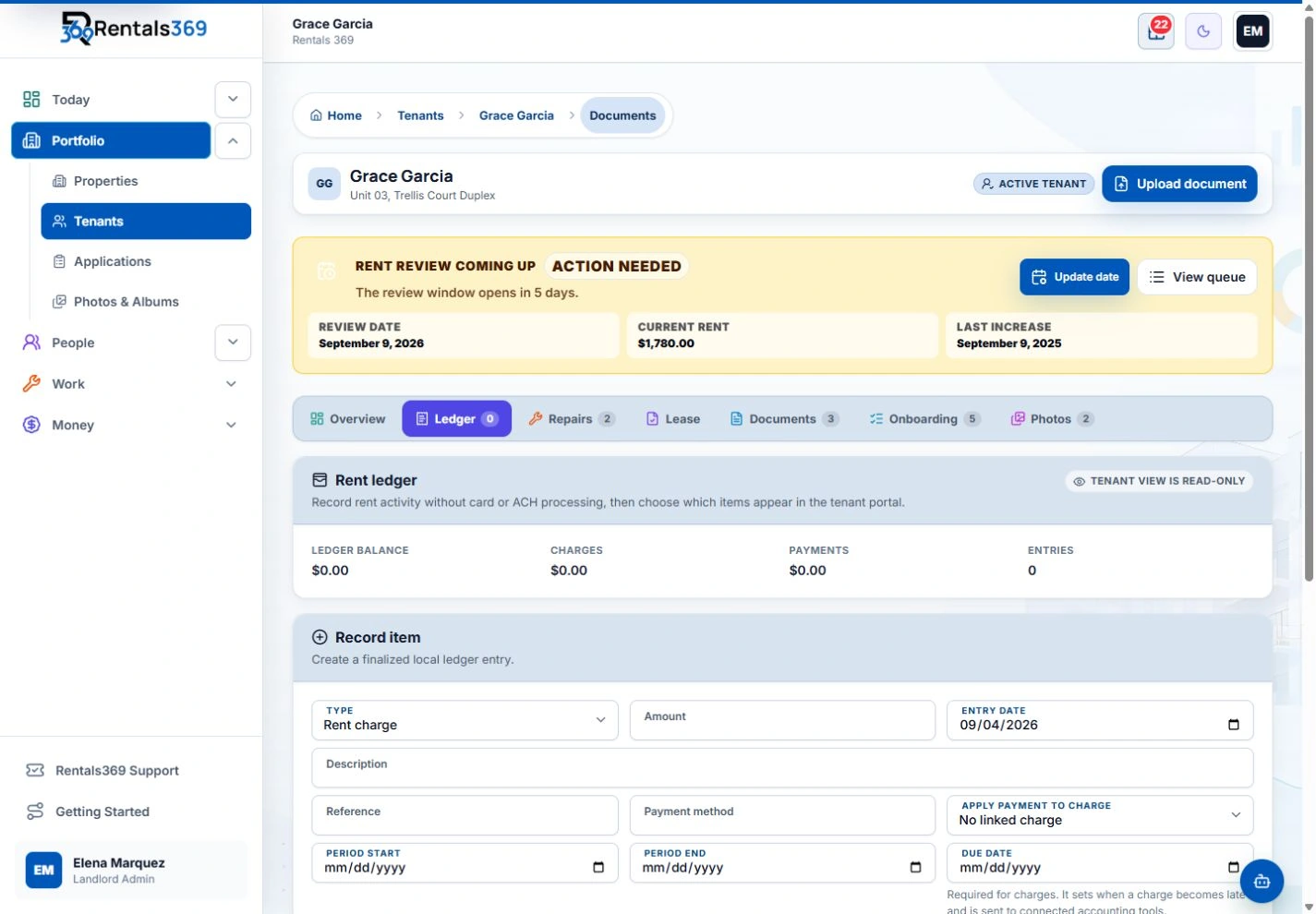
Rentals369 does not collect rent online or pay owners. You record the rent you receive on each tenant's rent ledger, shown here, and send distributions yourself. The plan also has team roles scoped by company and an audit log. For property managers, 100 tenants cost $409.50 a month.
Owner reports are ready each month without you building one.
More guides and tools
Rent ledger template
One tenant's charges, payments, and running balance, in Excel or as a PDF form.
Get the templateWork order template
The job, access, an approval limit, cost lines, and a sign-off for each repair you send a vendor.
Get the templateRent payment tracker
One row per unit and one column per month, so you can see who paid at a glance.
Get the trackerRental income and expense spreadsheet
Every dollar in and out of your rentals by category, with totals for tax time.
Get the spreadsheet
Get your evenings back.
One plan includes everything, with no setup fee: Email Sync with suggested replies, QuickBooks sync, DocuSign for your leases, the Android app, storage with no set limit, and portals for your tenants, vendors, and owners.
$59/month for up to 3 tenants, or $49.17/month billed yearly.
No-sweat guarantee: full refund within 30 days.