Property management software for property managers and teams
Get your evenings back, and your team's.
Staff, owners, and vendors work from one set of records, and each person sees only what their role allows. Connect your company inboxes and repair email arrives sorted, with a reply drafted for you to approve.
$341.25/month, billed yearly100 tenants, everything included.
- No-sweat guarantee: full refund within 30 days
- Owner and vendor portals included
- No setup fee
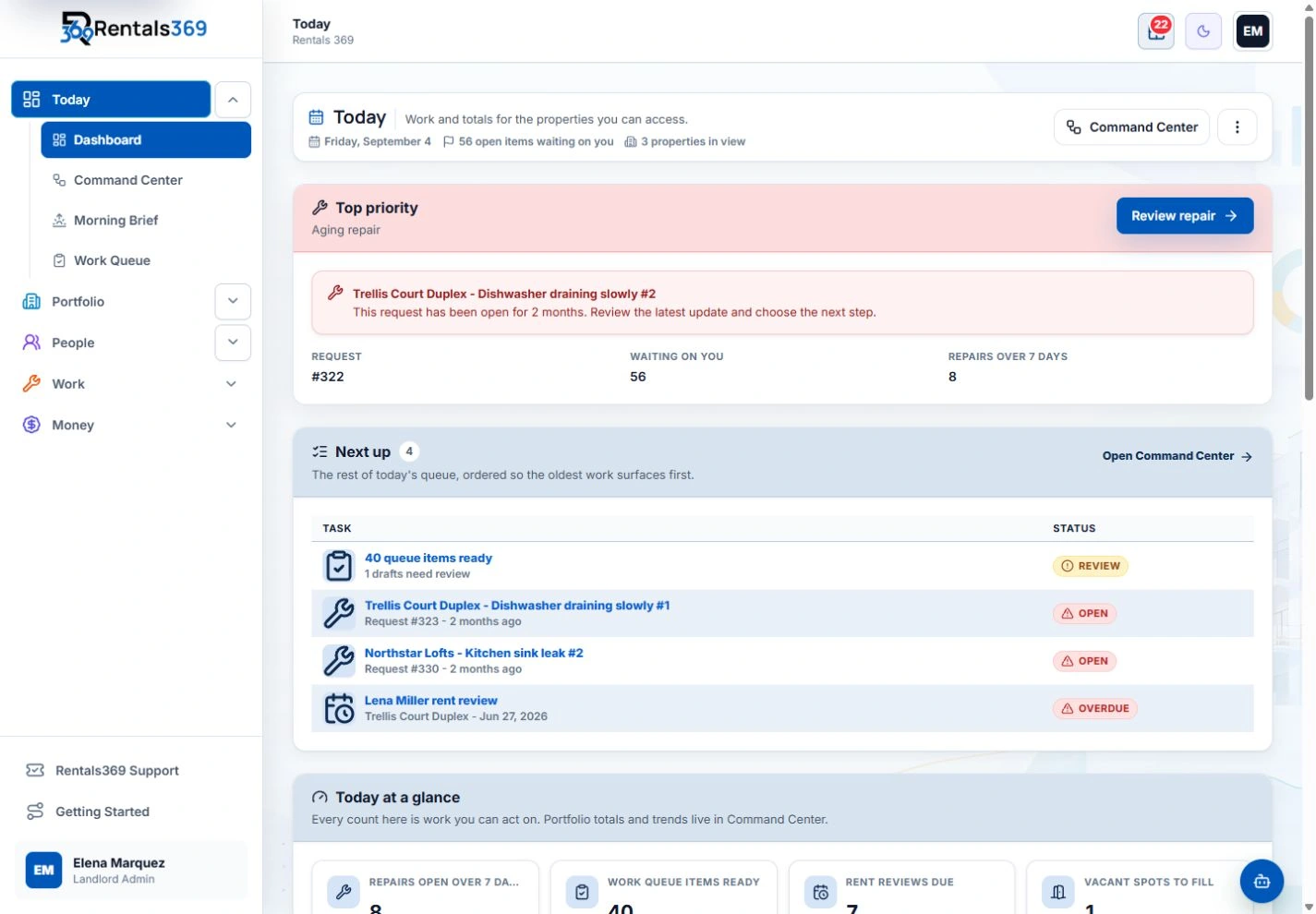
On a larger portfolio, every update runs through you.
A tenant emails about a leak at 10 PM, and someone has to find the vendor, chase an ETA, and tell the tenant. Owners want their monthly numbers, so someone builds a report, and rent and repair costs get typed into QuickBooks a second time.
Rentals369 is property manager software for independent managers and property management companies. It puts that work on one set of records, and each person handles their part in their own portal.
| The job | Without a system | With Rentals369 |
|---|---|---|
| Giving staff access | One shared login, or everyone seeing everything. | Each person signs in with a role scoped to your company. Two-factor sign-in is on by default, and an audit log records important account activity. |
| Deciding what comes first | Working through inboxes, texts, and notes to find what is overdue. | The Command Center puts the Morning Brief and the work queue on one screen, with the oldest work first. |
| Answering tenant email | Repair emails pile up in a shared inbox until someone sorts them. | Email Sync sorts repair email from your company inboxes by urgency, with a reply drafted for you. Nothing goes out until you approve it. |
| Dispatching vendors | Calling vendors for an ETA, then passing it on to the tenant. | Vendors accept the job, share an ETA, and record completion in their own portal, and the tenant sees who is coming and when. |
| Updating owners | Building a monthly report for each owner. | Each owner reads a monthly rent, maintenance, and net cash summary in their own portal, with a CSV download. |
| Keeping the books | Typing rent, payments, and repair costs into QuickBooks a second time. | Finalized rent charges, payments, late fees, maintenance expenses, and tenant invoices go one way to QuickBooks Online. |
No-sweat guarantee: full refund within 30 days
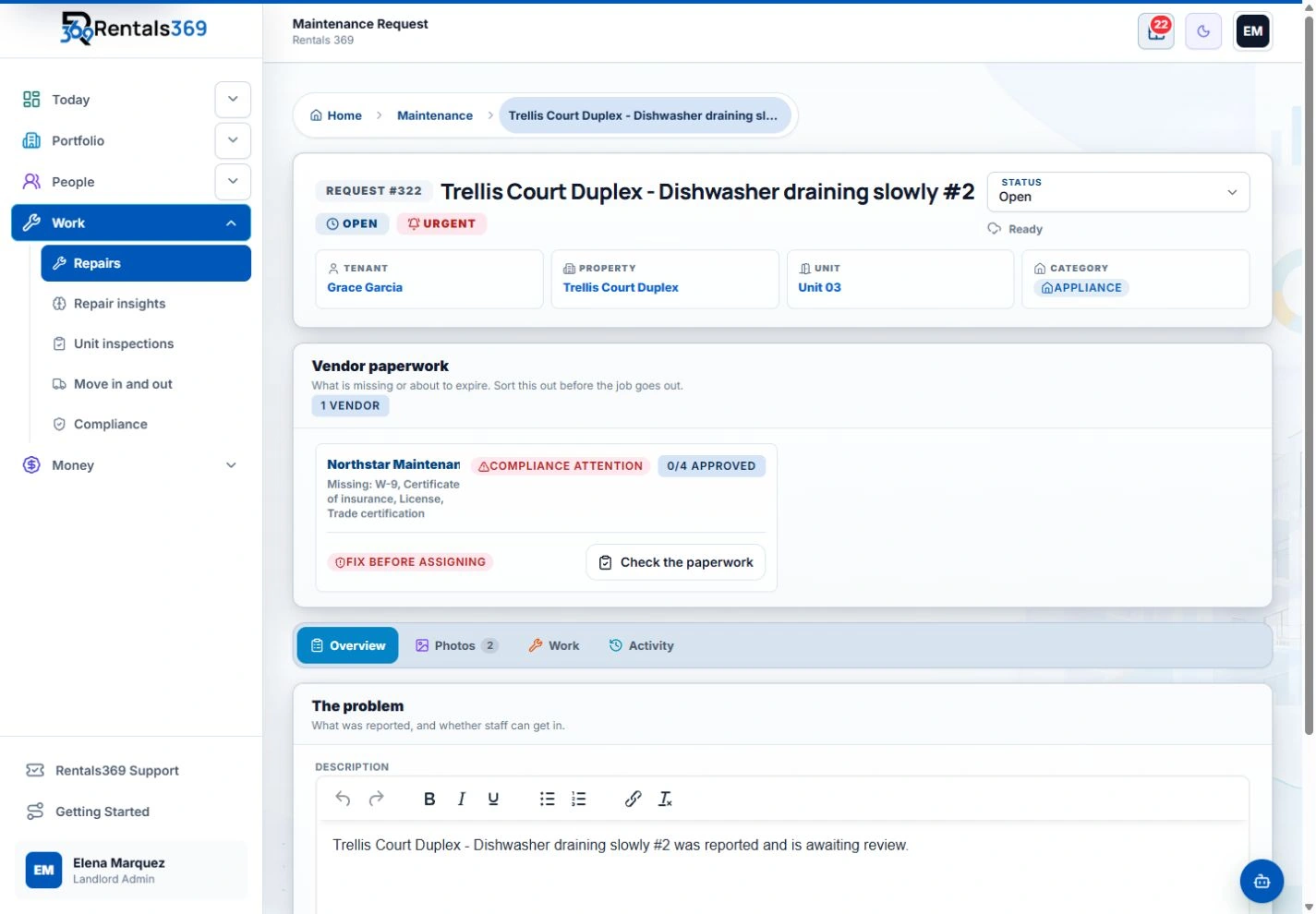
Dispatch repairs and manage vendors through the vendor portal.
Assign a vendor from the maintenance request. In their portal, vendors see only their assigned jobs: they accept or decline, share an ETA, and record completion on the original request.
- Vendor paperwork on file: compliance documents such as insurance certificates and licenses
- A history of accepted, declined, and completed jobs
Vendors post their own ETA and status, so you stop calling to ask.
No-sweat guarantee: full refund within 30 days
Owners read their monthly numbers in the owner portal.
Each owner gets a read-only sign-in for the properties assigned to them, at no extra cost.
- Monthly rent, maintenance, and net cash summary
- Recent owner distributions
- A CSV export of the monthly summary
- Tenant contact details stay hidden
Owner reports are ready each month without you building one.
Your team sees the work its role allows.
Every account has these tools and controls at no extra cost. Automated features such as suggested replies and email sorting run on hardware Rentals369 operates, and customer data is not used for training.
Command Center and work queue
The Morning Brief and the work queue put the day's work on one screen, with the oldest work first. The queue also suggests follow-ups on open repairs, compliance, documents, and onboarding.
Delinquency Worklist
It totals what is overdue across the portfolio and lists the tenants behind it, including rent you bill in QuickBooks.
Roles and company scoping
Landlords, managers, tenants, vendors, and owners see only the records their role and company allow.
Two-factor sign-in and an audit log
Two-factor sign-in is on by default. Important account activity is kept in an audit log for authorized review.
Encrypted sensitive fields
Selected contact details and sensitive Email Sync content are encrypted when stored.
Private file checks
A private file checks permission each time it opens, even from a forwarded link.
Everything in one plan, priced by tenant.
Every account gets all of this, at every size. Only the number of tenants changes the price.
- Email Sync with suggested repliesRepair email from your inboxes is sorted automatically, with a reply for you to edit and send. There's no set limit on inboxes.
- QuickBooks Online syncRecords go one way to QuickBooks Online, so your books stay current.
- The DocuSign connectionSend leases for signature from your own DocuSign account.
- Tenant, vendor, and owner portalsTenants report repairs and check their status, vendors post an ETA and record completion, and owners read a monthly summary.
- The Android appFor you and your managers, on Google Play.
- Storage with no set limitLeases, notices, photos, and repair files stay with their property or tenant.
- Every core featureThe rent ledger with late fees, repairs and vendor dispatch, tenant records, documents, inspections, roles, two-factor sign-in, and the audit log.
There's nothing to add on later, and no setup fee. See everything the plan includes
One plan, everything included
$341.25/month, billed yearly
For 100 tenants: $4,095 billed once a year, 2 months free. Or $409.50 month to month.
Start your accountThe risk is on us. No-sweat guarantee: full refund within 30 days, monthly or yearly, with no conditions.
Renews automatically until cancelled. Full pricing and terms.
What a larger portfolio pays.
The plan is $59 a month for up to 3 tenants, plus $4.00 each for tenants 4-25, $3.50 each for tenants 26-100, and $3.00 for every tenant after 100, with no cap. One tenant counts per occupied unit, so roommates count once, and inactive or past tenant records don't count.
| Tenants | How it adds up | Yearly | Monthly | Start your account |
|---|---|---|---|---|
| 50 | $59 + 22 x $4.00 + 25 x $3.50 | $2,345/year ($195.42 a month) | $234.50/month | Start with 50 tenants |
| 100 | $59 + 22 x $4.00 + 75 x $3.50 | $4,095/year ($341.25 a month) | $409.50/month | Start with 100 tenants |
| 250 | $59 + 22 x $4.00 + 75 x $3.50 + 150 x $3.00 | $8,595/year ($716.25 a month) | $859.50/month | Start with 250 tenants |
Running 20 units or fewer on your own? See the landlord page
Questions managers ask.
No-sweat guarantee: full refund within 30 days
If Rentals369 isn't right for you, ask within 30 days of your first payment and you get all of it back. It covers monthly and yearly plans and has no conditions, so the risk is on us.
What software do property managers use?
Most use a property management system for leases, tenants, rent tracking, maintenance, and owner reporting. Some systems include full property accounting, and others connect to accounting software such as QuickBooks Online. Rentals369 is the second kind: it covers the property side, with team roles and owner and vendor portals, and sends finalized records one way to QuickBooks Online. It does not collect rent online or post listings, so a firm that needs those keeps a tool that does.
Does Rentals369 work for large portfolios?
Yes. Teams get roles scoped by company, owner and vendor portals, and an audit log, and QuickBooks sync and Email Sync are included. 100 tenants cost $409.50 a month, and every tenant after 100 adds $3.00, with no cap.
Can I bring my existing records over?
Yes. In your account, Import from a spreadsheet moves your properties and tenants over from a spreadsheet, and nothing is created until you check the rows and confirm. If you're moving from another system, ask us.
Do tenants and vendors have to pay anything?
No. Their portals are included in your account, and they need no subscription of their own.
What if my number of tenants changes?
Change the count on your Billing page and the price follows it. A higher count is prorated from that day, and a lower one starts at your next renewal. Past tenants never count, so you don't have to delete anyone to keep the price down.
Is my data secure?
Every account has secure connections, access tied to role and company, permission checks on private files, and an audit log. Selected contact data and sensitive Email Sync content are encrypted at the application level. Two-factor sign-in is on by default, and you keep ownership of your records. See how each control works.
The full FAQ covers pricing, portals, integrations, and setup.
Read the full FAQEvery week you wait is another week of 10 PM emails.
Bring your team, owners, and vendors into one account today. Everything is included, and 100 tenants cost $341.25 a month billed yearly or $409.50 month to month.
No-sweat guarantee: full refund within 30 days, monthly or yearly, with no conditions.
No setup fee. Cancel anytime.