Free property maintenance work order template
A work order is the sheet you give a vendor for one repair: what to fix, how to get in, when to come, and how much they can spend before calling you. The tenant's maintenance request reports the problem, and the work order hands the job to the vendor. Print the PDF, or use the Excel version that adds up the costs.
- No account needed
- The PDF prints on one page
- Opens in Excel and Google Sheets
Work order example: a leaking kitchen faucet
Dana Reyes in Unit 2B reports that her kitchen faucet drips and that water collects in the cabinet under the sink. The landlord sends a plumber with a $300 approval limit. The plumber replaces the cartridge and both supply lines for $251.00, which is under the limit, so there is no call to make.
You fill in everything down to the approval limit before the job goes out. The vendor fills in the work performed, the costs, the photos, and the invoice, then signs.
| Field | Entry |
|---|---|
| Work order no. | WO-2026-014 |
| Date issued | 2026-11-03 |
| Priority and due date | Urgent, due by 2026-11-05 |
| Property and unit | 412 Alder Street, Unit 2B |
| Tenant | Dana Reyes, (555) 555-0148. She's OK with the vendor calling to confirm the visit. |
| Permission to enter | The tenant agreed to a visit on November 4 between 9 and 11 AM and may not be home. Notice given 2026-11-03. |
| Pets | One cat. Keep the front door closed. |
| Keys and lockbox | Key in the lockbox by the side door. Code given by phone. |
| Problem as reported | Request 118, 2026-11-02: "The kitchen faucet drips all the time, and water collects in the cabinet under the sink when it runs." |
| What to do | Find the leak and repair it. If the faucet body is cracked, call before replacing the faucet. |
| Vendor | Cedar Line Plumbing, plumbing, (555) 555-0173. License and insurance certificate on file, insurance good through 2027-03-31. |
| Scheduled visit | 2026-11-04, arriving between 9 and 11 AM |
| Approval limit | $300.00. Call before going over. |
| Work performed | Replaced the faucet cartridge and both supply lines, tightened the drain trap, and ran the water for 10 minutes. No leaks. |
| Photos | Before and after photos sent with the invoice. |
| Invoice | INV-3317, dated 2026-11-04, for $251.00. Paid 2026-11-12 by check 2045. |
| Sign-off | The plumber signed on 2026-11-04, the tenant confirmed the fix the same day, and the landlord approved the invoice on 2026-11-05. |
| Item | Quantity | Rate | Amount |
|---|---|---|---|
| Faucet cartridge | 1 | $42.00 | $42.00 |
| Braided supply line | 2 | $14.50 | $29.00 |
| Labor, plumber | 1.5 hours | $120.00 an hour | $180.00 |
| Total | None | None | $251.00 |
The Excel download has this example on its own tab. Type a quantity and a rate, and the amount and the total work themselves out.
Download for Excel or Google SheetsWhat to put on a work order
A good rental property work order answers the vendor's questions up front, so the only call you get is about a bill that would pass your limit.
A number, a priority, and a due date
Give every work order its own number so the vendor's invoice can point back to it. The priority and the due date tell the vendor how soon to come. The template uses the same priorities as the tenant request form: emergency, urgent, and routine.
The problem as reported
Copy the tenant's own words and the request number, then write what you want done. The vendor knows what the tenant saw, and you can trace the job back to the request later.
Entry, pets, and keys
Write whether the tenant will be home or has agreed to entry, and the date you gave notice. Your lease and state law set how much notice the tenant gets, so give it before the vendor goes. Note any pets and where the key or lockbox is. Give lockbox and alarm codes by phone, because a work order gets passed around.
License and insurance on file
Before the job goes out, check that you have the vendor's current insurance certificate, and their license where the trade and your area require one. The checkboxes on the form are the reminder.
An approval limit
The approval limit is the most the vendor can spend without calling you. A small job gets done in one visit, and anything bigger reaches you before the money is spent.
Materials and labor on separate lines
Parts go in as quantity times unit cost and labor as hours times rate, with a total under them. Separate lines make the invoice easy to check, and the total is what you record as a repair expense in your rental income and expense spreadsheet.
Before and after photos
Ask the vendor for a photo before starting and another when done. If the same problem comes back, or you need to show what was repaired during a tenancy, the photos show what was wrong and what was fixed.
Sign-off and invoice
The vendor signs that the work was done as described. The tenant signs that the problem is fixed, or you sign after checking it yourself. Then you write the invoice number and date on the work order and approve it for payment.
Printable work order form (PDF)
The PDF is one letter-size page with the same parts as the example. The top half is yours: the number, priority, and due date, the property and tenant, entry and access, the problem, the vendor and the visit, and the approval limit. The bottom half is for the vendor, with room for the work performed, four materials lines and four labor lines with totals, the photos, the invoice, and the sign-off.
Print a few blank copies to keep on hand. For each job, give the vendor one and keep a copy with the unit's records. To fill it in on a tablet, open it in a PDF app that lets you write on the page.
Work order template for Excel and Google Sheets
The workbook has four tabs. The Work order tab is a blank form to copy for each job, and the Example tab is the faucet repair above. On both, the amounts and the total fill themselves in, and the line under the total turns red when a job goes over the approval limit.
The Work orders tab is a work order list, with one row per job for its number, date, unit, vendor, priority, due date, status, and cost. A job past its due date that isn't done shows Overdue. The How to use tab has the steps.
Excel
Open rentals369-work-order-template.xlsx. If Excel shows a Protected View bar, choose Enable Editing so the totals can update. For each new job, right-click the Work order tab, choose Move or Copy, tick Create a copy, and rename the copy after the work order number.
Google Sheets
Go to sheets.google.com and open a blank spreadsheet. Choose File > Import, select Upload, and pick the .xlsx file. Set Import location to Replace spreadsheet, then choose Import data. The formulas and the over-the-limit warning keep working. For each new job, right-click the Work order tab and choose Duplicate.
Word
There is no Word file, but Word can open the PDF. Choose File > Open in Word and pick the PDF, and Word turns it into a document you can edit. Check the layout before you print, because the conversion can move lines.
How to use a work order, from request to paid invoice
The steps are the same on paper and in the spreadsheet.
Start from the tenant's request
Every work order starts with a request, written down with a date and a number. The free maintenance request form and repair log covers that step. In an emergency, call the vendor first and fill in the work order after.
Open the work order
Give it the next number, set the priority and due date, copy the problem as reported, and write what you want done.
Arrange the visit
Agree on a time with the tenant, give the notice your lease and state law require, and fill in entry, pets, and keys. Add the scheduled date and arrival window once the vendor confirms.
Send it with a limit
Check the vendor's insurance and license, fill in the approval limit, and send the work order with the tenant's photos.
Get it back with the invoice
The vendor fills in the work performed, the cost lines, and the photos, signs, and returns the sheet with the invoice. If the job went over the limit, the sheet shows who approved the extra and when.
Check, pay, and close it
Ask the tenant whether the problem is fixed and compare the invoice to the cost lines. Then pay it, add the cost and the date paid to your work order list, and file the work order with the unit's records. The guide on how to handle tenant maintenance requests covers priorities and response times.
Work order questions
What is the difference between a work order and a maintenance request?
A maintenance request comes from the tenant and says what is wrong. A work order comes from the landlord or property manager and tells a vendor what to fix, how to get in, when to come, and how much to spend. One request usually leads to one work order, though a bigger repair can need two, such as one for the plumber and one for the drywall afterward. For the request itself, use the free maintenance request form.
Who signs a work order?
The vendor signs when the work is done. The tenant signs to confirm the problem is fixed, or you sign after checking the work yourself if the tenant isn't home. Then you or your manager approve the invoice for payment. The template has a line for each.
What is an approval limit on a work order?
An approval limit, also called a not-to-exceed amount or NTE, is the most the vendor can spend on the job without calling you first. If the vendor finds a bigger problem, they call, you approve a new amount or a different plan, and the change goes on the work order with your name and the date. Base the limit on what similar jobs have cost you.
How should I number work orders?
Use one running sequence for all your properties with the year in front, such as WO-2026-014, and never reuse a number. Ask vendors to put the number on their invoices, and write the tenant's request number on the work order. Then any invoice traces back to its job and to the request that started it.
Should I give the vendor the tenant's phone number?
Only with the tenant's OK. A vendor who can call the tenant can confirm the visit and ask what the tenant saw, which can save a trip. If the tenant would rather not share it, leave the phone line blank and pass messages yourself. Give lockbox and alarm codes by phone, never on the sheet.
Repairs and vendors in Rentals369
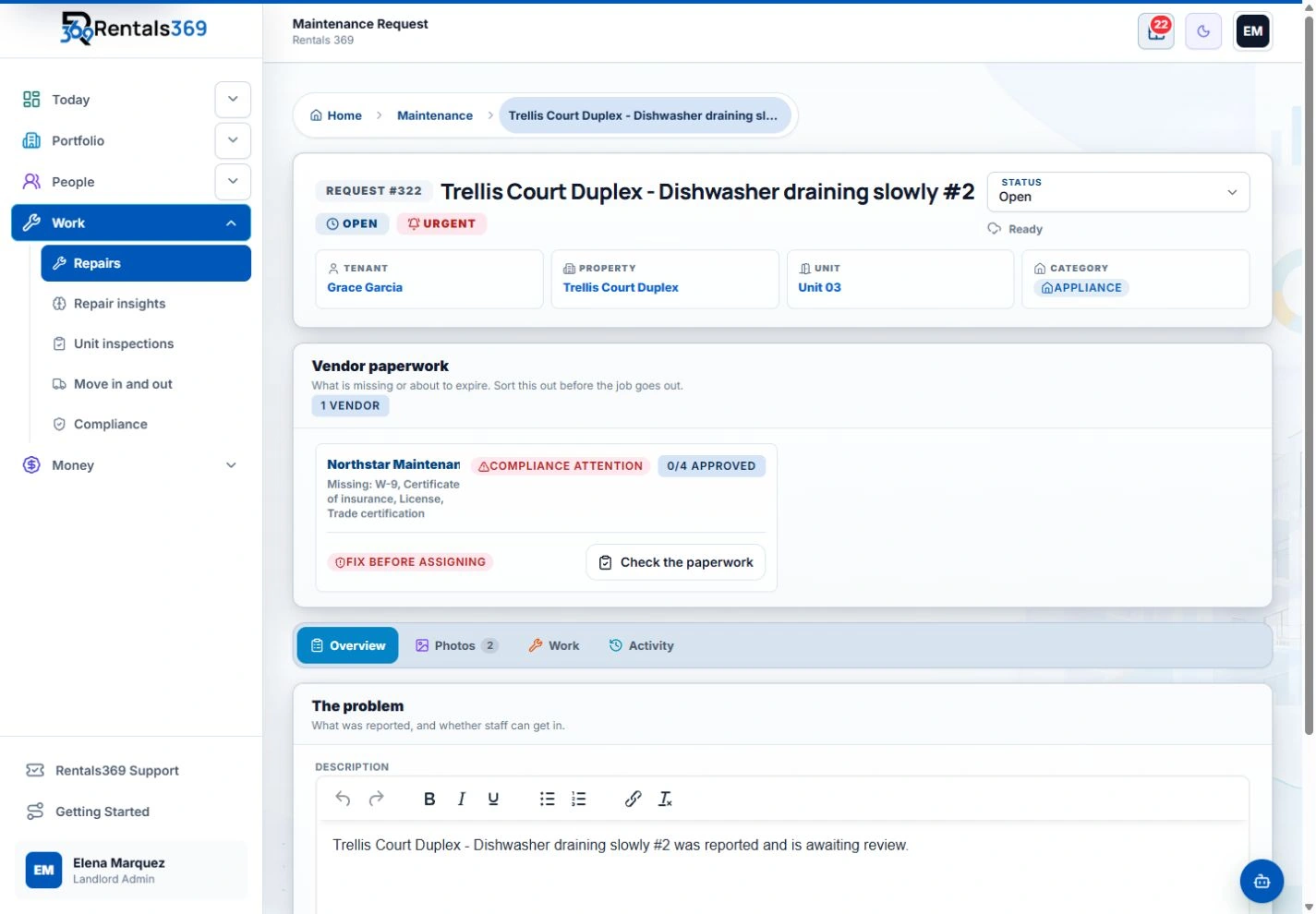
A paper work order works for a few units. In Rentals369, tenants report repairs from their portal with photos. You set the priority and a due date, then assign a vendor on the request itself. The vendor portal is included in every plan.
- Up to 30 repair photos per request, from any phone
- Vendors see only the jobs you assign them, accept or decline each one, and share an ETA
- Vendors keep compliance documents on file and record completion on the request
- Due dates, an overdue filter, and overdue repairs counted on the Today dashboard
- Each repair keeps its photos, comments, and status changes, and an activity log records who changed what
Repair emails from your inbox arrive sorted, with a reply drafted for you to approve. Turnover and work-order tracking covers the time between tenants.
The vendor records completion on the request, so you don't copy a paper sheet into your records.
More guides and tools
Maintenance request form and repair log
The step before the work order: the tenant reports the problem, and the log keeps every repair for a unit.
Open the formHow to handle tenant maintenance requests
Priorities, response times, vendors, and keeping the tenant updated.
Read the guideRental income and expense spreadsheet
Record what each repair cost, with totals by category for tax time.
Get the spreadsheetMove-in and move-out checklist
Record each room's condition at move-in and again at move-out, then print it.
Open the checklist
Get your evenings back.
One plan includes everything, with no setup fee: Email Sync with suggested replies, QuickBooks sync, DocuSign for your leases, the Android app, storage with no set limit, and portals for your tenants, vendors, and owners.
$59/month for up to 3 tenants, or $49.17/month billed yearly.
No-sweat guarantee: full refund within 30 days.